
 Live Commerceby skyware
Commerce that goes straight
from live stream to purchase
Live Commerce Platform
A live commerce platform that presents products through live streams, VOD and shoppable video, and lets viewers order while watching. iOS and Android apps and the admin console are built together.
AI LiveCommerce
Watch, ask, and buy on the spot
Link the CLOUVI AI chatbot to your live streams
to recommend products that answer viewer questions,
and keep sales going after the stream with captions, translation and auto-generated VOD.
- AI Product PickIn-stream product picks with CLOUVI
- Caption & TranslationReach more viewers with captions and translation
- Auto VODAuto-generated VOD after each stream
- Live AnalyticsImprove streams with viewing and purchase data
- KO
- 흰색은 240 사이즈부터 있어요
- EN
- White is available from size 240.
- 中文
- 白色从240码起有货。
Hi everyone, today I’m introducing our new fall daily sneakers. White starts from size 240.

- MinjiDoes the coupon work now?
- JunhoIs white in 240 available?
- SuaJust ordered 🎉
Do you have white in size 240?
Yes, white in 240 is in stock. Shall I add it to your cart with the 10% stream coupon?
- Stream ReplayReady
- Shoppable video · 3 product tagsPublished
Screens are illustrative examples.
Overview
Live Commerce Platform Overview
Live streams broadcast through OBS, VOD created automatically when the stream ends, and shoppable video that adds products straight to the cart. The apps and operating tools a brand needs to broadcast and sell itself.
LIVE
Live streaming
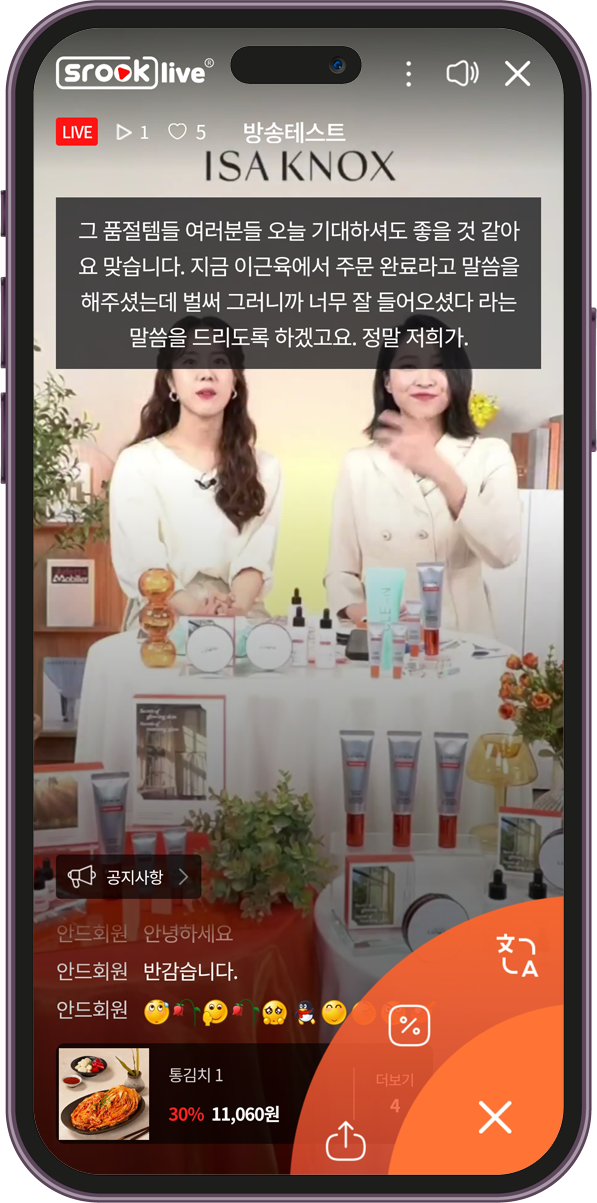
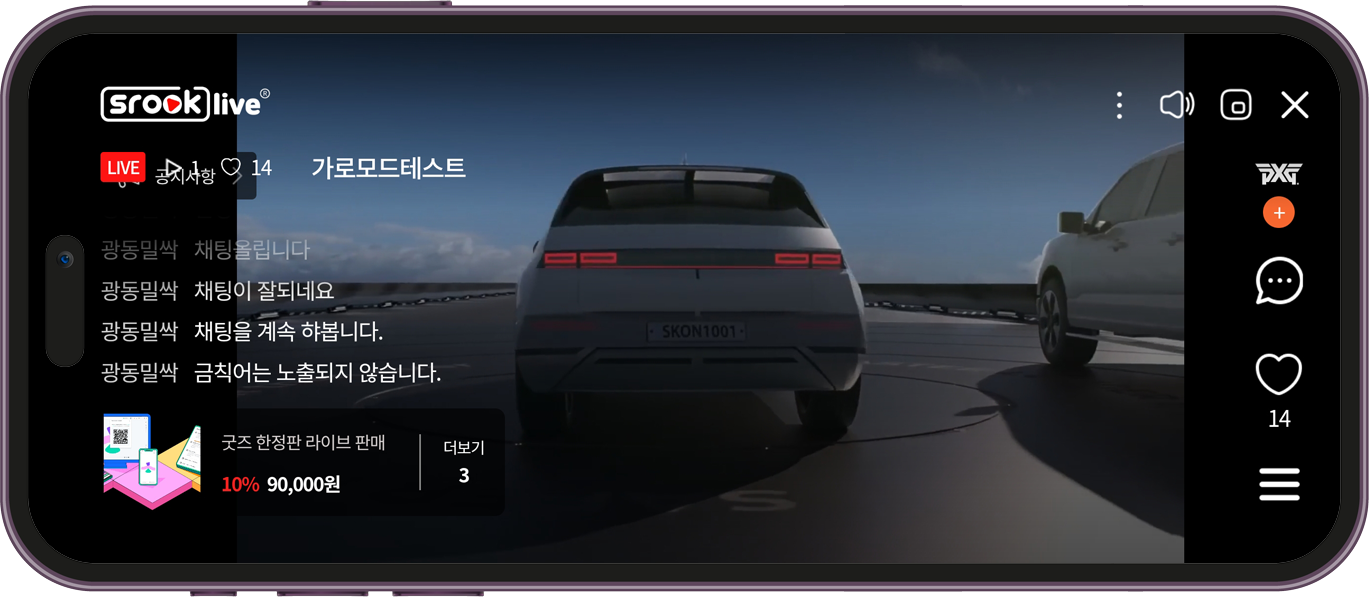
High-definition streams through OBS, with landscape live, subtitles, translation and picture-in-picture viewing.
VOD
Automatic VOD
When a live stream ends, a VOD is created automatically so viewing and buying continue afterwards.
SHOPPABLE
Shoppable video
Products tagged in short videos go straight to the cart and checkout while watching.
ADMIN
Admin console
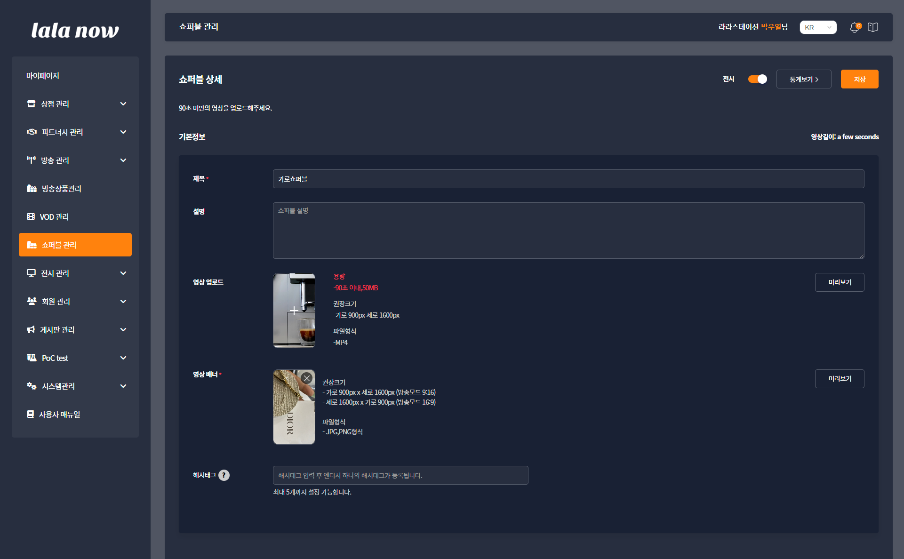
Stream setup, live control, merchandising, members and shoppable video managed on one screen.
Key Features
From streaming to purchase and operations on one platform
A feature set proven in a real build.
01
OBS live broadcasting
- Live streaming through OBS
- Device rotation for landscape live
- Subtitles and translation
- Minimized and picture-in-picture viewing
- Live chat
02
Buying and offers while watching
- Floating menu during live and VOD
- Featured products, coupon display and redemption
- Stream notices and FAQ
- 1:1 chat between customers and admins
- Offer banners and sharing
03
VOD, shoppable video and app screens
- Automatic VOD after live ends
- VOD registration for initial data
- Shoppable video registration and management
- Stream schedule and brand main page
- Common bottom floating menu and My Page
04
Stream and merchandising management
- Stream management: live setup and hosting
- Stream console: control of the live stream in progress
- Merchandising: main and list display
- Shoppable video management
05
System and user management
- System: codes, permissions, users, batch, Lottie
- Users: member data, SMS and email sending
06
Integration and extensions (optional)
- Integration with SCOS commerce, payment and membership
- Stream notifications and coupon messages through sOMP
- Stream product recommendations through the CLOUVI AI chatbot
Screens
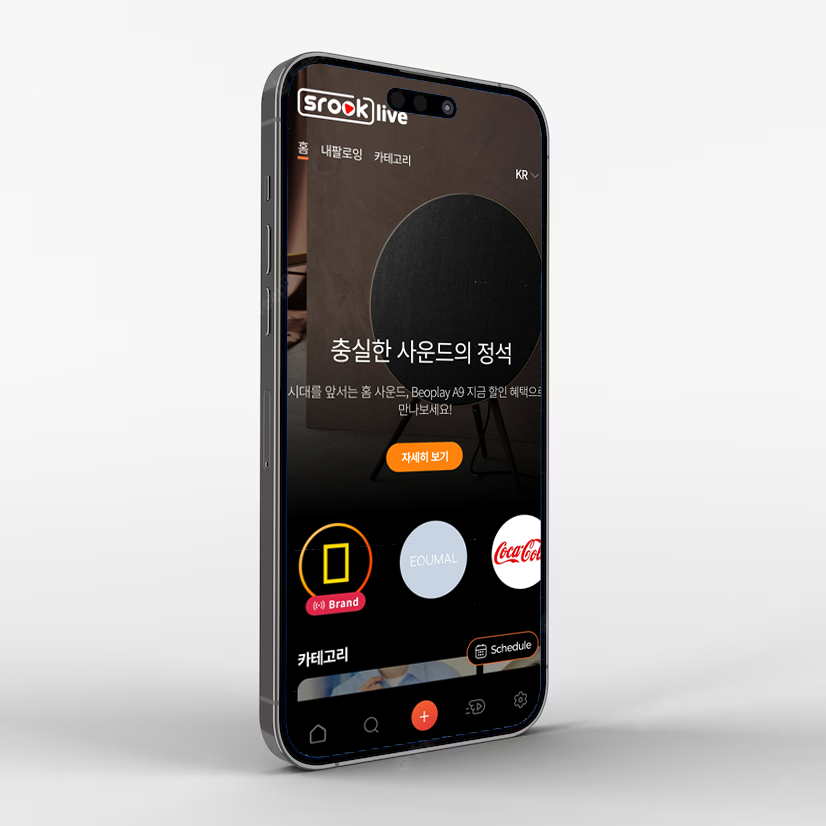
App and admin console
The app screens viewers use and the console screens operators use.
Build Process
Six steps from planning to app launch
From planning to iOS and Android app launch in one continuous run.
STEP 01
Requirements and stream scenarios
Plan
Stream format (portrait or landscape), product structure, coupon and offer policies and the operating team are defined.
STEP 02
UX and UI design
Design
Viewing screens, floating menu, product cards and chat flow are designed to the brand guidelines.
STEP 03
Streaming and video infrastructure
Streaming
OBS broadcasting, streaming and VOD storage, and subtitle and translation services are integrated.
STEP 04
App and console development
Build
iOS and Android apps and the admin console are developed and integrated with commerce, payment and membership systems.
STEP 05
Test streams and store review
Test
After live rehearsals and load testing, the apps go through App Store and Play Store review.
STEP 06
Launch and operations
Launch
After launch we support stream operations and improve streams and product lineups with viewing and purchase data.
Case Study
Live commerce platform build
We built a commerce service around live streams and VOD and launched iOS and Android apps.
Delivery
End-to-end responsibility
Skyware led and coordinated planning, design, app, server and admin development all the way to launch.
Scope
iOS · Android apps + admin
Two viewer apps and the PC admin console were built together.
Outcome
Released on the App Store and Play Store
Passed review, launched on both stores at once and moved into operations.
Frequently Asked Questions
What streaming equipment do we need?
A camera and a PC with OBS are enough to stream. You can also start with a smartphone camera and no studio equipment.
Can it integrate with our existing mall?
Products, members, orders and payments are integrated via API. SCOS connects directly, and other malls are integrated within an agreed scope.
Can we run it on the web only, without apps?
Yes. You can start with a mobile web viewing screen and add iOS and Android apps later in stages.
How are stream notifications sent?
Alongside app push, sOMP can send SMS and Kakao Alimtalk to announce stream starts and coupons.
Considering live commerce?
Tell us your stream format, sales structure and the systems to integrate, and we will propose an approach and a quote.
Live Commerce Quick tour
From live show to checkout, in one platform
Introduce products through live shows, VOD and shoppable videos, and let viewers order while they watch. We build the iOS and Android apps and the admin console together.
Skyware Co., Ltd. · Contact +82-2-714-0704 · sky@skyware.co.kr
Live Commerce · Broadcast
OBS live streaming
Stream in high quality with OBS, with landscape live, captions, translation and PIP viewing.
- OBS streaming
- Landscape live · captions · translation
- PIP · live chat
Live Commerce · Broadcast
Automatic VOD
A VOD is created automatically when the live show ends, so viewing and buying continue.
- Auto VOD after live
- VOD upload · management
- Show schedule
Live Commerce · Buying
Buy while watching
A floating menu shows show products and coupons so viewers can buy without leaving.
- Floating product menu
- Coupon display · apply
- 1:1 chat · sharing
Live Commerce · Buying
Shoppable videos
Tag products in short videos and send viewers straight to cart and checkout.
- Product-tagged videos
- Direct cart · checkout
- Shoppable management
Live Commerce · Operations
Admin console
Set up shows, control live shows, manage displays and members from one screen.
- Show setup · live console
- Main · list display
- Members · SMS/email
Live Commerce · Operations
Integration · extensions
Connect commerce, payment and members, plus messaging and AI recommendations.
- SCOS commerce · payment
- sOMP alerts · coupons
- CLOUVI AI picks