
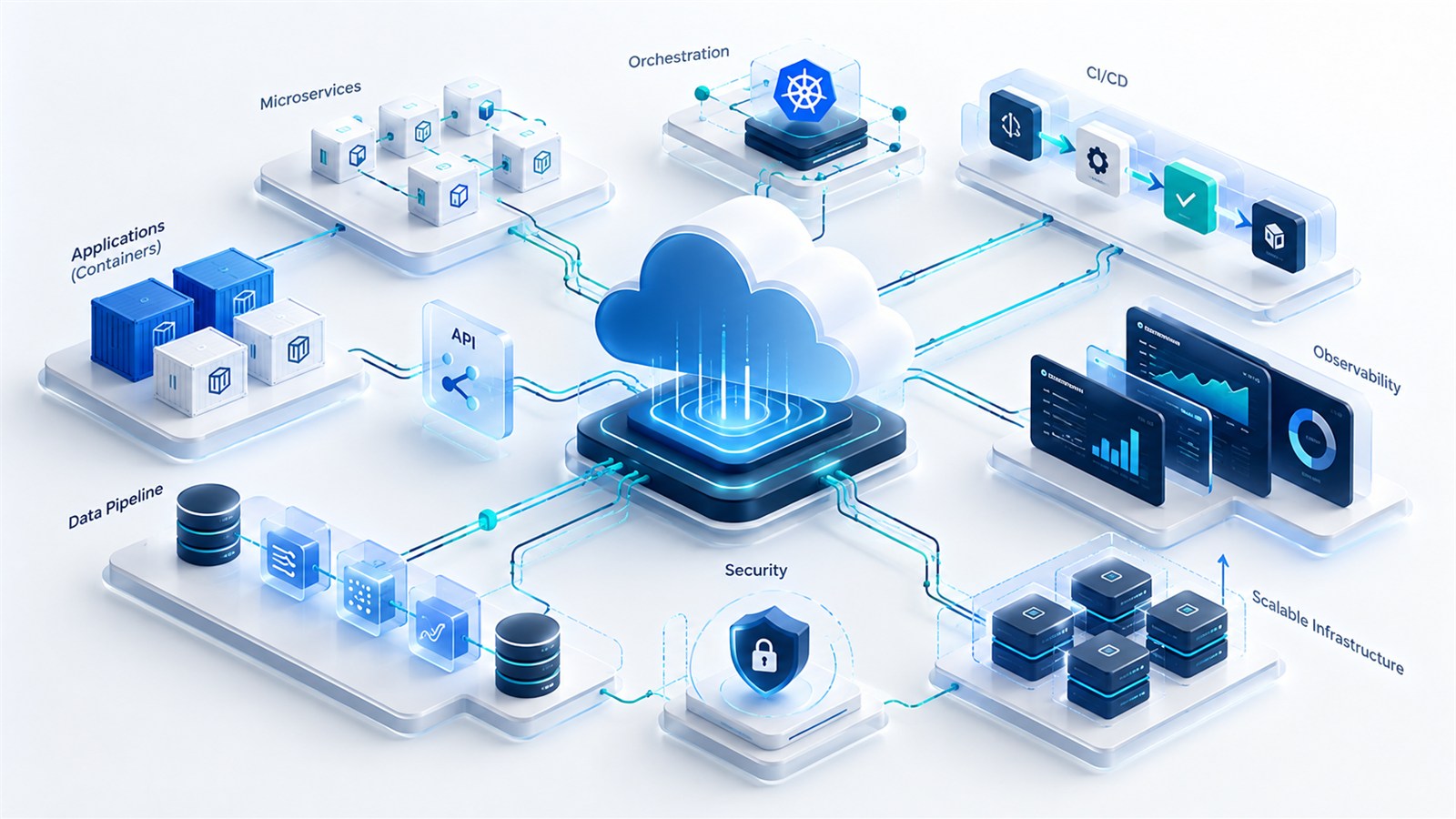
How far has service operations come in 2026?
June 16, 2026 | SKYWARE INSIGHT
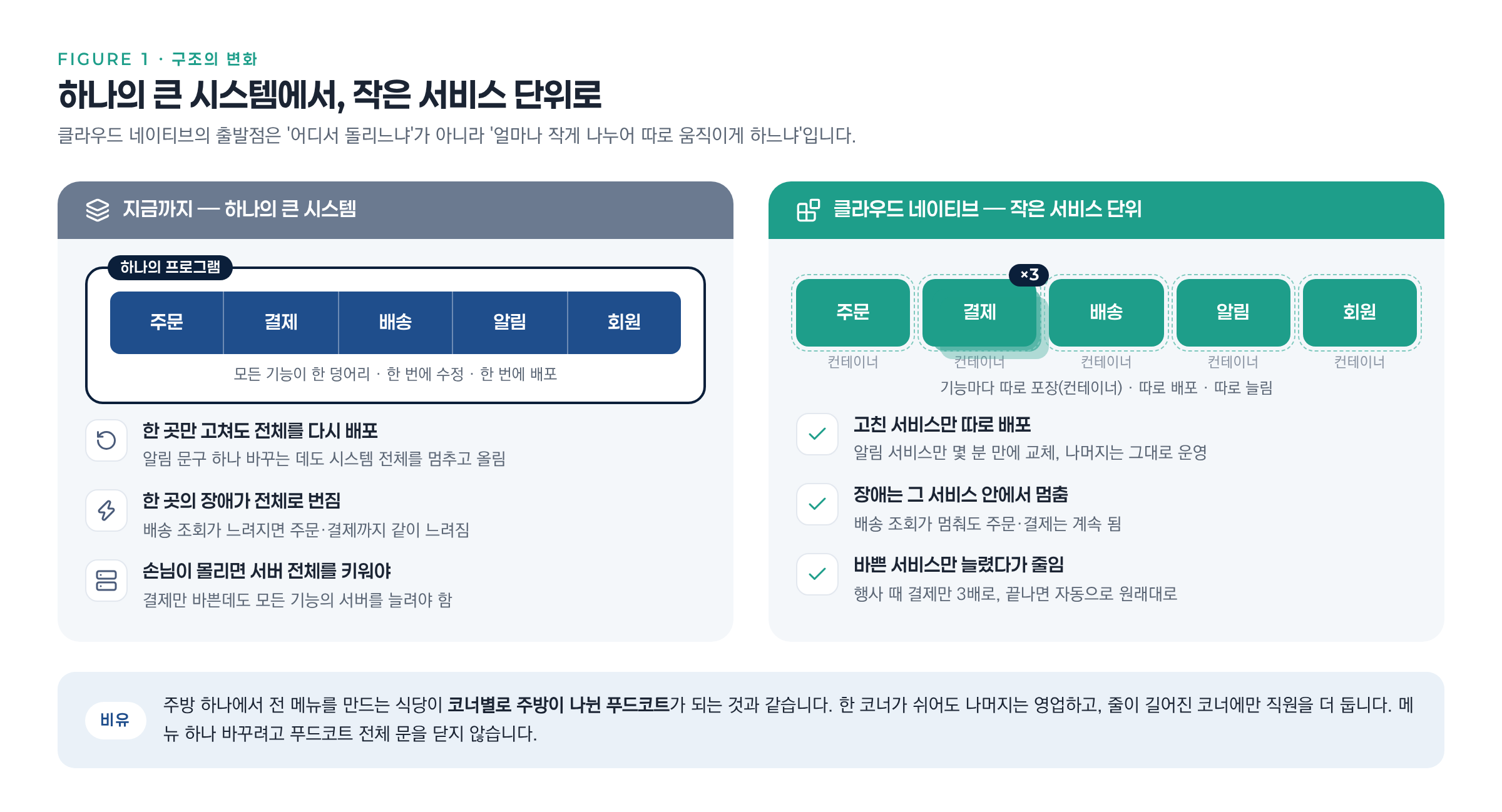
Picture a restaurant with just one kitchen. Changing a single menu item means shutting down the whole kitchen, and if one fryer breaks, every order backs up. When customers flood in, the only option is to enlarge the entire kitchen. Many companies’ systems run just like this “one-kitchen restaurant” today.
Cloud native turns that restaurant into a food court with a separate kitchen for each counter. Functions such as orders · payments · shipping · notifications are split into small units, and each one is fixed separately, deployed separately, and only the busy ones are scaled up. Terms like containers, Kubernetes and CI/CD are simply the names of the tools that run this food court.
Why We’re Talking About It Again Now
As a service grows, so do “the time and risk involved in fixing and releasing a single change.” That hasn’t changed in ten years. What has changed comes down to two things.
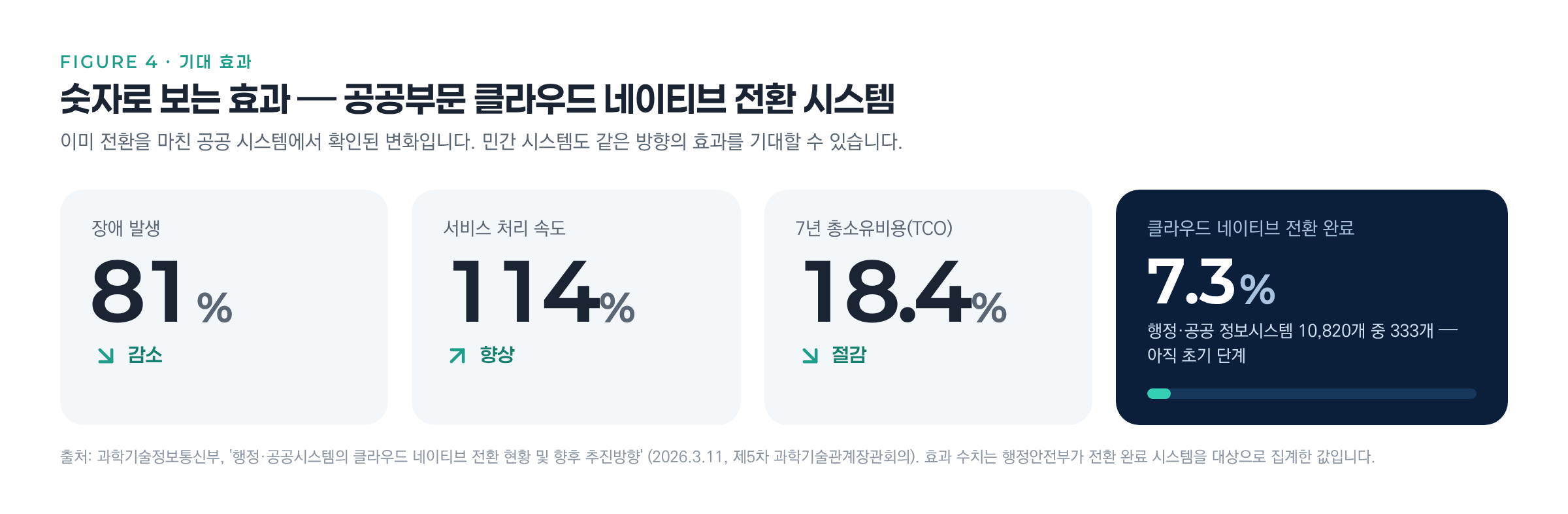
First, the technology has become much easier. Kubernetes, released in 2015, turns eleven this year, and most of the work experts once did by hand has been automated. Second, the benefits are being confirmed in numbers. According to a government announcement in March 2026, public-sector systems converted to cloud native saw outages fall by 81%, processing speed rise by 114%, and total cost over seven years drop by 18.4%.
Six Things That Have Changed in 2026
① Paving a “golden path” so developers don’t need to know the infrastructure Platform Engineering
In the past, developers had to handle even server configuration themselves. Now, operations teams lay down a path in advance: “Build to this template, and deployment and monitoring are attached automatically.” According to surveys, more than one in four organizations (28%) have a team dedicated to this work.
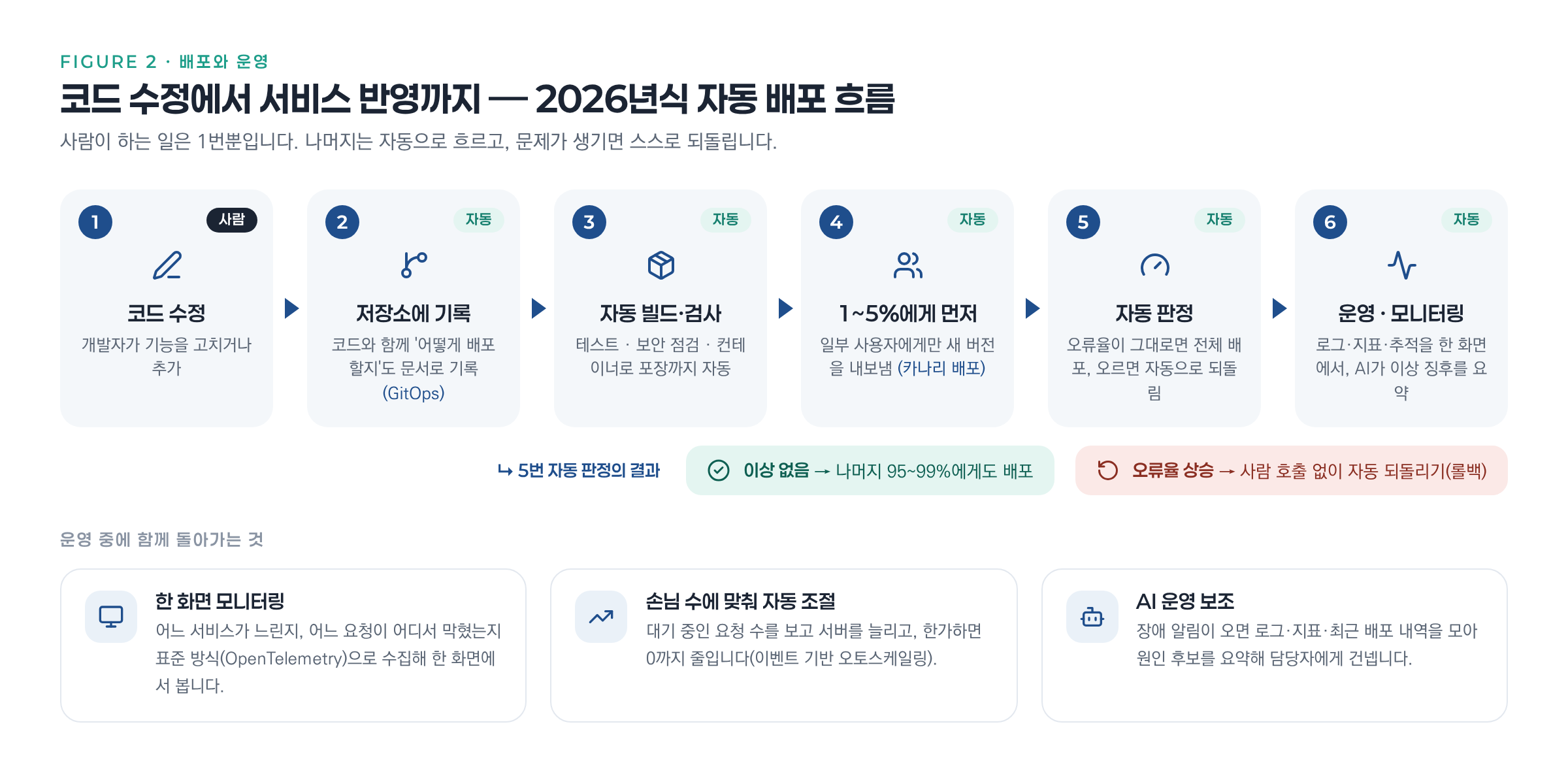
② Rolling out gradually instead of all at once, with the ability to roll back Canary Releases
A new version is first shown to only 1-5% of all users, and if errors don’t increase, it’s released to everyone else. If a problem occurs, the system automatically reverts to the previous version before anyone is even called. This is where the old formula of “deployment is a nerve-racking job done at dawn” disappears.
③ Seeing on one screen where things are slow and where they’re stuck Observability
By collecting logs · metrics · request flows in a standard way (OpenTelemetry), teams can pinpoint right away “whether payments are slow because of the payment service itself or the card company integration behind it.”
④ Servers scale up and down on their own to match customer demand Autoscaling
Servers are scaled based on actual workload, such as “number of pending orders” or “number of queued messages,” rather than CPU figures. During an event, payments alone can be tripled, then scaled down to zero afterward to save costs. It’s a perfect fit for jobs where traffic spikes by dozens of times, such as bulk message sending or promotions.
⑤ AI workloads run the same way
GPU servers used for AI training · inference are shared as needed, and large jobs are launched all at once when all of their pieces are ready. In November 2025, a “Kubernetes AI Conformance” certification program was established to set these standards. 35% of organizations run AI tools on their existing platforms rather than building separate, AI-only systems.
⑥ AI enters operations, and cost management extends to AI
When an outage alert comes in, AI gathers logs and recent deployment history, summarizes “the most likely cause is this,” and passes it to the person in charge. Conversely, as AI costs grow, cost management (FinOps), which tracks how much each service spends, is expanding to cover AI workloads.
Expected Benefits
- Scaling Up and DownScales up within seconds under load and down to zero when idle.
- Faster ReleasesMoves from a monthly deployment at dawn to multiple zero-downtime releases a day.
- Smaller Blast RadiusA problem in one service doesn’t spread to the whole system.
- Less Manual WorkDeployment · certificate renewal · security rule checks run automatically.
- Cost VisibilitySeeing where money is spent makes it possible to cut back.
Still, Not Every System Is a Candidate
Some companies have gone the other way. In 2023, a team at Amazon Prime Video merged finely split services back into one and cut costs by more than 90%, and 37signals left the cloud and returned to its own servers. The more you split, the more there is to manage, so systems with no reason to be split are better left as they are.
That’s why the recommended starting point these days is “a structure deployed as one unit but with boundaries drawn inside” (a modular monolith). Keep the service as one for now, but apply containers · automated deployment · monitoring from the start. Later, split off only the parts that have truly grown large. This is because much of the benefit of cloud native comes not from “where it runs” but from “how it’s built and deployed.”
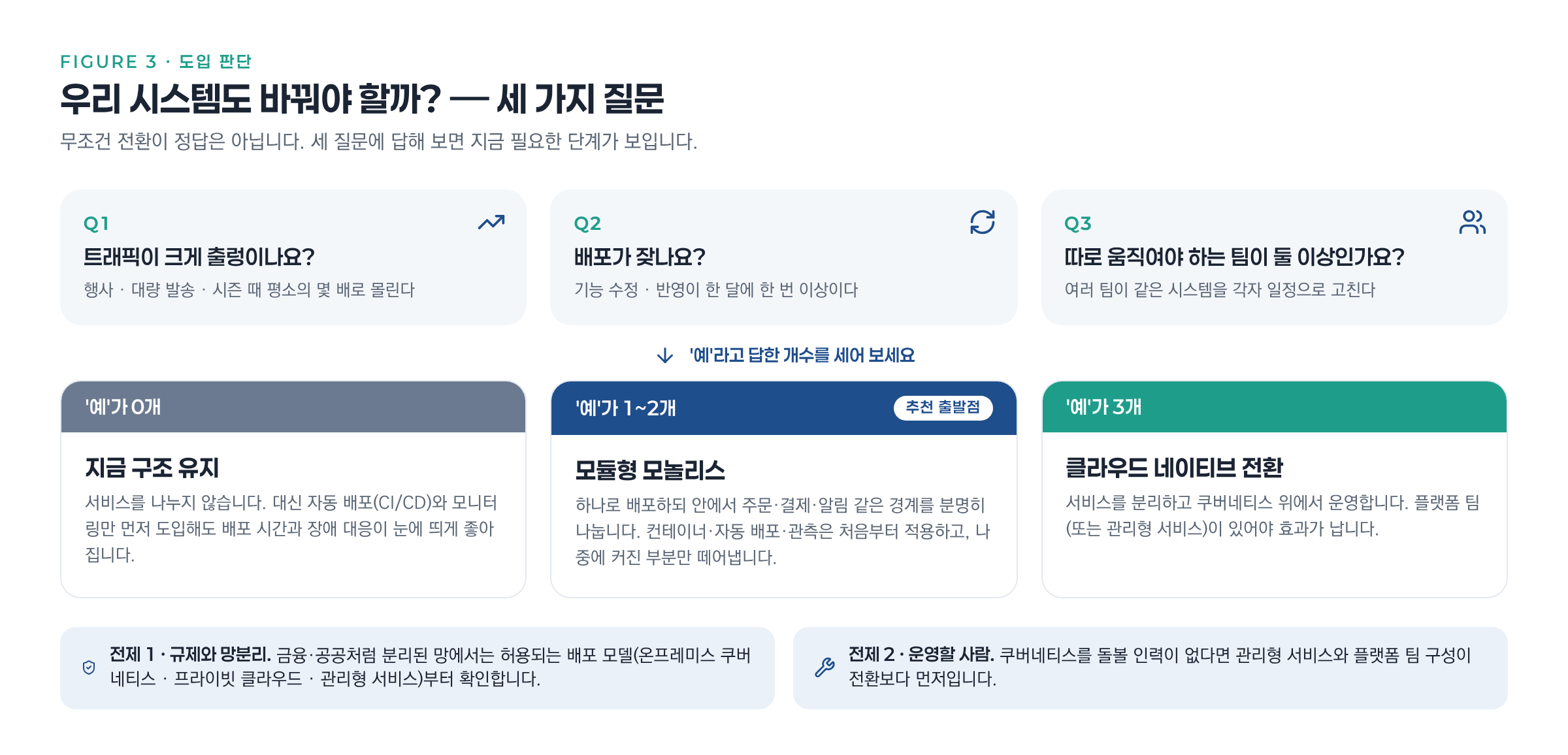
Ask just three questions, and the step you need now becomes clear. Does your traffic fluctuate widely? Do you deploy more than once a month? Do you have two or more teams that need to move independently? If the answer to all of them is “no,” keep the current structure and introduce only automated deployment and monitoring first. If one or two are “yes,” start with a modular monolith. If all three are “yes,” a transition to split services is the right move. However, in network-segregated environments such as finance · the public sector, you must first check which deployment methods are permitted, and if there’s no one to look after Kubernetes, the right order is to start with a managed service.
Skyware’s Approach
Skyware has supplied its commerce (SCOS) and messaging (sOMP) solutions as on-premises installations and ASP, tailored to each customer’s environment. We support both single-unit and split deployment structures, and apply designs such as queuing messages for sequential processing, separating servers by channel, and redundancy with two servers serving simultaneously, as-is within customers’ internal networks.
Before deciding whether to move to the cloud, we work with you to design what units to split into, and how to deploy and monitor them.
One-Line Glossary
- Container
- A packaging unit that bundles a program with the libraries · settings it needs to run, so it runs in the same environment on any server. Unlike a virtual machine, it doesn’t contain an entire operating system, so it’s lightweight and starts in seconds.
- Kubernetes
- An open-source management system that decides where and how many of hundreds of containers to run across multiple servers, restarts them when they fail, and swaps in new versions. It is the de facto standard for container operations.
- CI/CD Continuous Integration · Continuous Delivery
- A pipeline in which pushing code to a repository automatically triggers build · test · security checks · container packaging · deployment. By eliminating manual handoff steps, it reduces deployment mistakes.
- GitOps
- An operating model in which server configuration and deployment settings are written in a Git repository like code, and automation tools keep the actual system consistently in sync with the repository. It leaves a history of who changed what, and rollbacks are also done in Git.
- Canary Release
- A deployment method that first releases a new version to only 1-5% of all users and monitors error rates and response times, then expands to everyone if there are no problems or immediately reverts to the previous version if there are. The name comes from the canary in the coal mine.
- Observability
- The ability to understand from the outside what is happening inside a system and why, by collecting logs · metrics · traces (the paths requests take between services) together. The standard for collection is OpenTelemetry.
- Autoscaling
- A feature that automatically increases and decreases the number of containers or servers based on traffic or pending workload. In Kubernetes, tools such as HPA, or KEDA for event-driven scaling, handle this.
- Platform Engineering
- The practice of operations teams building and providing an internal developer platform with deployment · monitoring · security built in, so development teams don’t have to handle infrastructure directly.
- Modular Monolith
- A structure deployed as a single program but with clear internal boundaries between areas such as orders · payments · notifications. It makes it easy to split off only the parts that grow large later.
- Microservices
- An architecture in which small services split by function are each deployed and scaled independently and work together over the network. It’s flexible, but the more you split, the more there is to manage.
- Managed Kubernetes
- A service in which a cloud provider operates the control plane of Kubernetes on your behalf. It’s the first choice when you don’t have dedicated staff.
- FinOps
- A cost management practice that makes cloud costs visible by service · team and has engineering and finance adjust usage together to reduce waste. Recently, it also covers AI workload costs.